Moving a WordPress site? We’ve moved WordPress sites 100s of times in connection with our WordPress SEO Services. Your site move will be easier and faster by following these tips. Essentially, we want to shrink the size of the site and its corresponding database (and do some cleaning/housekeeping). If you want to preserve a copy of your site as-is, run a backup (and run the backup the right way)because what we’ll be doing will make the site smaller, but we’ll be doing some deleting–keep that in mind.
Delete Old Unused Plugins
If plugins are inactive, you’ll still be moving the files if you move a site. Go into the admin area of WordPress and navigate to Plugins. Inactive plugins will look like the following:
Remove Your Caching System Thoroughly
If you run any caching plugin (like W3 Total Cache), you will be moving an enormous amount of files when you move your site. Also, you’ll likely break all the caching anyway. The best approach is to simple remove ALL caching elements: all plugins as well as all cached files. You can remove the caching plugin simply enough, but deleting the plugin likely won’t delete all the files. To delete the cached files, you’ll need to go into your cpanel, or FTP (you’ll have to hunt down information on those if you don’t know what they mean).
Once you get into the actual website files, you’ll see something like this:
That folder, “cache”, has a LOT of files in it and can be removed. You might also find other cache-related files & folders.
Remove WordFence Thoroughly
Wordfence is great, but it uses a LOT of resources. I like deleting the Wordfence plugin as well as the WordFence log files which you can find at /wp-content/wflogs, you can see that folder in the picture above. Once you move your site, you can reinstall WordFence.
Clear Your WordPress Revision History
WordPress stores versions of your pages as you edit them. Over time, hundreds of versions of your posts and pages can build up. This is a safety feature because you can always call up a prior version of a page by checking the revision history. The problem is that these extra versions bloat the WordPress database. I keep this clean whether or not I am moving a site.
You can clear out this revision history with a simple SQL command. Before you step further: this step is irreversible, you’ll be deleting prior versions of posts.
To clear the revision history, we need access to SQL. The easiest way for most will be to log in to cpanel and then select phpmyadmin. You want to select the database for your WordPress installation in the left navigation and then click the SQL tab at the top of the main table, like so:
In the SQL edit window, you enter the following command:
DELETE FROM wp_posts WHERE post_type = "revision";
This will delete all prior post versions from your database.
Once you have built a form within Gravity Forms, we want to make sure our future website visitor receives an email confirmation that their entry has been submitted. You can easily set this up within WordPress.
Before We Start: Confirmations, Email Confirmations, and Email Notifications
Confirmation means the visual response that a web visitor sees on their screen immediately after completing and submitting a form
Email Confirmation means an email that is sent to the user immediately after completing/submitting a form
Notification is the email that you receive when a customer completes the form on your website
Creating a confirmation that the user sees on their screen after filling out a form:
1. In WordPress Dashboard (you need to log in) along the left menu panel, click on Forms
2. Hover your mouse over the form you created, select Settings
3. Click Confirmations, and you’ll see the following:
4. Select Add New by clicking the button.
5. Select which confirmation type you want users to receive
Text: Create a message that users will see
Page: Redirects users to another WordPress page on your site
Redirect: Redirects users to any public URL (typically, you won’t use this)
6. Save Confirmation when you are satisfied with your changes
7. Test the form as if you were a user to make sure you see the confirmation message on the screen.
Setting up email notifications Part 1: YOUR notification
Once you have built a form in Gravity Forms, you obviously want to receive the messages from the forms to your email inbox, we’ll call this an admin notification. Optionally, we can send the user a confirmation email, which we’ll do in the next step.
Let’s create our admin notification:
1. In WordPress along the left menu panel, click on Forms
2. Hover your mouse over the form you created, select Settings
3. Click Notifications, and then select Add New. Now you’ll see the page below, and you’ll enter some settings here.
4. Enter a Name for your form, we recommend Admin Notification
5. Send To is important: here you want to to enter the email where you want to receive notifications when users fill out the form
6. Your form also needs “From” information, this part is easier than it looks:
In the From Name, From Email, and Reply To fields, notice the little pull-down arrow to the right of the blank field. If you pull down that arrow, you’ll see an entry for each of the fields you made when you created your form. So, the Your Name field was one we created, and we can set that as the From Name in our notification. When in doubt, just set it up like we did.
7. Made sure you see {all_fields} in the Message box like in the screen shot. This means that all the form fields that the user fills out will get sent in the email to you.
That’s it, save your form and then test it by filling it out yourself to see if your form sends the email.
Setting up email confirmations Part 2: sending email to the user
This is optional, but a good practice: when a user fills out your website form, we can send them an email telling the user “we received your message and will reach out shortly”. We call this an email confirmation. We set this up in the same manner as the admin notification with one or two differences.
Let’s create our email notification:
1. In WordPress along the left menu panel, click on Forms
2. Hover your mouse over the form you created, select Settings
3. Click Notifications, and then select Add New. Now you’ll see the page below, and you’ll enter some settings here
4. We need to set the Send To field. We simply click the Select a Field radio button and then set the Send to Field to the field name we made when we built our form for the user to enter their email
5. For the From fields, you can just enter your email. This will show you as the email sender when the email is sent to the user.
6. And, of course, fill out your Message, which becomes the body of the email notification.
7. Don’t forget to enter something like “customer notification” in the Name field
Save your notification, and as always with web forms, test your form after you create or make a change!
https://tastyplacement.com/wp-content/uploads/wordpress-hosting.png344880Michael Davidhttps://tastyplacement.com/wp-content/uploads/tastyplacementneedssvg.svgMichael David2018-08-23 06:22:542018-08-23 08:22:44How to Set Up Form Confirmation Emails in WordPress (Gravity Forms)
Answer: File size. SVG Graphics Files can reduce image file size by 99%. With the use of SVG files, we’ve reduced the entire load size of https://tastyplacement.com to 311k at the time of this writing.
SVG stands for Scalable Vector Graphics. Because an SVG file is vector-based, the image is essentially a tiny text file that defines image elements by vector position, not by storing byte-hungry, pixel-by-pixel information.
Lower file size/weight means faster loading times on all devices. Faster loading means a better user experience, lower bounce rates, and higher search rankings (so says Google, my friends).
Here’s a sample, here is a PNG file, compressed as aggressively as possible. At 800 x 344 pixels, weighs 44k:
But what can be done with SVG? The following file, which is infinitely expandable in display size, comes in at a slender 8k:
Some Limitations (and Dangers) With SVG Files in the WordPress Environment
First of all, SVG files are not native to WordPress–the media gallery doesn’t recognize the files. We’ll return to that in a minute. Second, SVG files, while rendered by modern browsers as graphics, are really text/script files. SVG files can contain exploits. So, if you maintain a website that allows the public to upload SVG files, you’d be exposing your site and site visitors to exploits. Remember I said that.
There is a third danger, and that is that older browsers may not render SVG files at all, or in an unexpected way. Microsoft’s IE8 and older are reported to not support SVG rendering. But I care so little about pandering to IE, that I haven’t even bothered to test it.
Setting WordPress to Support SVG
Okay, so WordPress doesn’t natively support SVG. There are a ton of ways to set WordPress to accept SVG files but most are not secure, and most do not enable thumbnails in the WordPress media gallery. Solution? There is a plugin that addresses both: the Save SVG plugin (link to repository files). Safe SVG does two things: it offers basic security sanitization, and it enables management of SVG files in the WordPress media gallery.
Next Steps With SVG
SVG files can be challenging to work with, they can’t be edited with traditional graphics software like Gimp and Photoshop. An SVG is more akin to an Adobe Illustrator file. Photographs aren’t suitable for SVG, but logos and patterns can be adapted to SVG quite easily.
The SVG sample above was created with Inskape SVG editing software. I struggled with that program for about the first hour but then found my sea legs and made some good progress. The “W” WordPress logo I got from the WordPress media kit and overlayed it on the pattern image with Inkscape.
https://tastyplacement.com/wp-content/uploads/wordpress-tutorial.svg00Michael Davidhttps://tastyplacement.com/wp-content/uploads/tastyplacementneedssvg.svgMichael David2017-07-06 15:25:142018-10-19 12:45:02How to Use SVG Files With WordPress
If you’ve found this post, congratulations on your unlikely visit.
Why unlikely?
Because if you are seeking information–unbiased information–on WordPress hosting, you’ll be inundated with PPC ads, crappy/biased affiliate “review” sites, remarketing ads, and fluff pages from mega-hosting companies like MediaTemple and WPEngine. And this flood of marketing material is part of the problem: WP hosting is big business and the big hosting companies want that business. So, in any Google search, the top few pages are all paid marketing.
So, I am going to lay it all out for you.
Why listen to me? Well, because I don’t want to sell you hosting; that is my principal qualification and an important one. What I do want, however, is that if you come to TastyPlacement as a client that you will come to us with good hosting. I have installed and optimized WordPress over 1000 times with dozens of different hosting providers, from $1000 a month dedicated servers to $2 a month shared hosting. I have used everything from basic cPanel interfaces, to Plesk, to dedicated control panels like the type that RackSpace and MediaTemple offer. I have witnessed WordPress sites that take 20 seconds to load, and I have optimized them down to 1 second load times. I have seen enough and know enough to cut through the B.S. The marketing illusion and the basic reality are very different.
Let’s begin with a look at that $2/$1000 price difference…
The $2 Hosting Was Faster than the $1000 a Month Hosting
Yep, I got a $2 a month hosting account through a coupon on WebHostingTalk.com that was perfectly acceptable and actually delivered pages very speedily. The $1000 a month hosting is a managed, dedicated hosting account with a national provider that offered a lot of extra services like regular backups, but very little in actual performance. Remember, Google will reward you with higher search rankings if your site delivers pages more quickly to users–Google laid down this page-speed dictate back in 2010.
Site speed only correlates to the cost of hosting if you know what you are doing. The site you are on right now, TastyPlacement.com, is on a very vanilla Apache VPS that costs just a bit more than shared hosting–yet this site’s load speed and reliability far exceed anything I have ever tested on any of the big WP hosting servers. The irony is that the hosting we have is as far away from niche hosting as you can get! Ok, so how to improve your hosting situation? We’ll cover some tips as we move through this post.
There Is No Such Thing As “WordPress Hosting”
Think about the notion of “WordPress Hosting”. WordPress is a universal platform built to run on PHP–that’s the prerequisite. The whole point of WordPress is that it is universal, there is very little that can be done to an Apache/PHP server to make it run WordPress better that you can’t do with any Apache/PHP hosting account. There’s no secret black box that some hosting company can add over another. In fact, nearly every WordPress-specific hosting company actually makes matters worse for the WordPress user.
WordPress-Specific Hosting, and the Common Theme of Paternalism
I already have a dad, I don’t need or want my hosting company making decisions for me. There may be features I want, but ultimately, I care deeply about site speed. Curiously, WordPress hosting companies speak of security and restrictions as “features”. In fact, WordPress “features” may actually slow your site down, and MediaTemple, we are looking at you.
Just do a search for “MediaTemple disallowed WP plugins” (I won’t link to this atrocity), and you’ll find dozens of plugins they simply won’t let you run. On this list you will find nearly every worthwhile caching plugin on God’s Green Earth:
w3-total-cache
wp-cache
wp-file-cache
wp-super-cache
wp-fast-cache
wp-fastest-cache
wp-cachecom
quick-cache
Of course, MediaTemple touts their own caching feature, but I have personally never seen it perform very well. No one single solution is ever going to work for every website.
WPEngine also disallows several dozen plugins, including several caching plugins. And again, WPEngine has simply never appeared to me to deliver pages that quickly.
Aside from the obvious speed advantages that well-tuned caching can deliver, you might want to run Statpress, or WP Power Stats for statistics on your WordPress installation. But stop right there–these plugins are on MediaTemple’s forbidden list.
Now, you may want to have all this done for you–and that’s certainly a selling point. But for customization and truly otherworldly site speed, you will get greater control, greater flexibility, better customization and faster site loading speeds with generic hosting.
So What Kind of Hosting Is Best?
I am bullish on VPS hosting right now. Most sites do not need the power of a full dedicated server, and for those medium-to-small sites, VPS fits the bill at a better price point. Either of those choices will do, but the feature you want with both is solid state drives (SSDs). SSD hosting is faster because the drives are faster. You can get SSD hosting in either a VPS or full dedicated configuration.
Shared hosting is just too much hassle these days. Hostgator and Bluehost routinely have support response times in excess of 48 hours on their shared hosting accounts.
Forget Windows hosting–it’s just too troublesome to get working with WordPress and once you do, it’ll be slow. You want Apache/Linux hosting with WHM software (Website Hosting Manager, part of the full cPanel package). WHM will give you a handy interface to manage features.
Where Can I Get Unbiased Reviews of WordPress Hosting?
So, with so much paid biased marketing going on, where to turn for the truth?
Anywhere but from hosting companies themselves.
I mentioned one source already: WebHostingTalk. This forum is where webmasters go to talk about hosting, review providers and there are several great companies on there that routinely offer coupons. I also like HostBenchmarker.com which offers secret tests of website hosting performance.
https://tastyplacement.com/wp-content/uploads/svg-wordpress.svg00Michael Davidhttps://tastyplacement.com/wp-content/uploads/tastyplacementneedssvg.svgMichael David2017-05-09 05:48:282018-10-19 12:54:29The Truth About WordPress Hosting
Here’s how to fix the dreaded “HTTP error” when uploading images through WordPress’ media uploader. We’ve seen this with JPG files and it basically boils down to filesize or just a bad file.
These Tips Will Fix “HTTP Error” on Media Upload 99% of the Time:
Shrink the Image: Use Photoshop or Pixlr (online photo editor) to simply shrink the image file size. A 4000×3000 pixel image will often not upload.
Run the image through (the amazing) TinyJPG at tinyjpg.com. You won’t change the image dimensions, but you’ll actually shrink the filesize and remove some unnecessary meta information. This process will help your page load faster, which helps with conversions and with SEO.
Update your WordPress version to the current version.
You can always try converting the image from .jpg to .png or vice versa. Photoshop or Pixlr can help with this.
As a last resort, when all else fails, display the image and do a screen capture with “ALT+PrtScrn” buttons or a screenshot extension in chrome and then generate a new file.
I wouldn’t trust a plugin to do a WordPress backup, but if you must, try UpDraft and cross your fingers. First of all, how will you ever know that the plugin is secure? How will you know if the plugin is working correctly? Finally, you’ll need the plugin to restore the backup–what if the plugin isn’t updated for the current version of WordPress?
To Backup WordPress the Right Way, Do a Direct Database Backup
A WordPress installation is composed of two separate but integrated components–and a full backup requires you to backup both components. First (and easiest) is the php and script files that run the installation and the template. These are files that exist on your web server/hosting account. You back up these files with an FTP program like FileZilla. An FTP backup is the easy part of backing up a WordPress installation–but won’t represent a complete backup.
Simple Steps to Backup WordPress’ FTP Files
First look at the following photo, it’s what a WordPress installation looks like in an FTP program (you want to backup the folders and files you see here):
So here are the steps to backup:
You need an FTP program installed on your local PC, we recommend open source FileZilla.
Use your web hosting password and log into FTP using FileZilla.
Download the files described above to your local machine.
Part 2: The Database Backup
The second component of a WordPress installation is the WordPress database, and backing up this part is a bit more difficult. The database stores user information, all the text of your pages and posts, and your plugin settings. Your WordPress database runs within software that runs on your webserver–it isn’t a file or set of files that is easy to just copy to your local PC. In 99% of cases, you can get to your database by logging into the admin area for your web hosting account. For a Hostgator or Bluehost account you simply point your browser to yoursite.com/cpanel (cpanel is common web hosting management software). For GoDaddy and some other hosts that use their own administration software, you’ll need to hunt a bit to get to your database.
Step 1: Log in to Cpanel
If I go to tastyplacement.com/cpanel, I get to this screen. From there I use my account password; pretty darn easy.
Step 2: Find phpMyAdmin and Get In!
If you have cPanel, your phpmyadmin is in there somewhere…find it and click to enter the program.
Then you’ll see the phpMyAdmin software interface, and your databases will be listed in the left column. You want to keep your server name and database names private, so I’ve grayed out mine here. Click on the name of your WordPress database to enter the database.
And here it is, your WordPress database. Here’s an important distinction: your WordPress installation has ONE database and within that database is 15 or more tables. In the example below, the tables (like “wp-commentmeta”) are listing in the main column:
Step 3: Export the Database to Your Local PC and Save as a Backup (and Promise You’ll Go Slowly and Carefully)
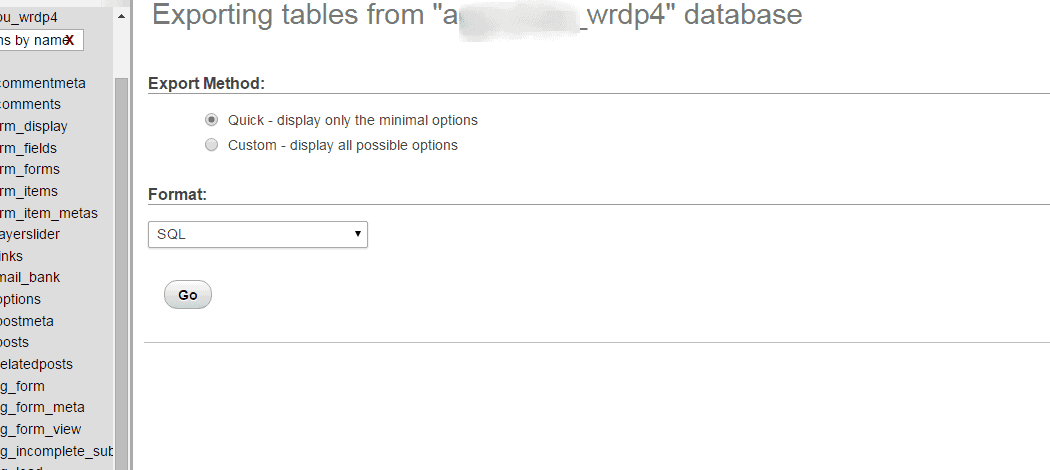
You need to make sure you backup ALL the tables, because phpMyAdmin will certainly let you backup some, one, or all of the tables within a database. It’s easy: from the view above, scroll to the bottom of the table and “Check All”, and then select “Export” from the drop-down like so:
Here’s a safety note, as you might imagine, the selections on that drop-down menu “drop” and “empty” would be very bad, as in your site would be totally destroyed. And so here is the last screen:
I would use these options without customizing anything. You might be tempted to change the “Format”, but don’t. SQL backup format is going to be the most universal and will cause the fewest problems when restoring your backup. Just click “Go” and download the file to a safe place.
Questions? Post ’em up in the comments! Your WordPress backup will be your savior if your WordPress site gets hacked.
https://tastyplacement.com/wp-content/uploads/wp-tutorial2.jpg384848Michael Davidhttps://tastyplacement.com/wp-content/uploads/tastyplacementneedssvg.svgMichael David2015-12-28 13:05:072018-10-17 08:19:57How to Backup WordPress the Right Way
https://tastyplacement.com/wp-content/uploads/wp-tutorial2.jpg384848Michael Davidhttps://tastyplacement.com/wp-content/uploads/tastyplacementneedssvg.svgMichael David2015-11-02 17:39:132015-11-02 17:39:13How to Log Into WordPress
A Complete Starter Guide to Writing, Editing and Maintaining Your WordPress Site
Updated for 2016!
Congratulations on setting up your first WordPress website. This is a guide to writing and editing web pages on your WordPress site. As you use, update, and maintain your site, you will begin to understand why WordPress is one of the most powerful and free content management systems (CMS) online and how it will benefit your website or blog for a long time to come.
In this guide, we’re going to show you the basics on how to manage your WordPress site, including logging in, posting new articles and pages, uploading images, creating and editing menus and widgets, and some more advanced features as well.
First, How to Log in to Your WordPress Website
There is more than one web address (URL) that you can use to access your log in screen.
The first is to point your web browser to: yourdomain.com/wp-login.php.
The simplest, however, is to go to: yourdomain.com/wp-admin.
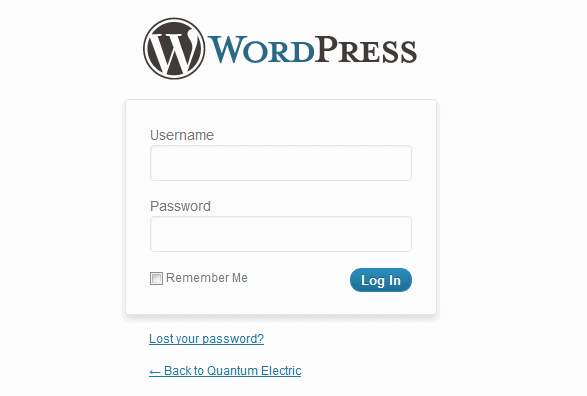
You will be greeted with the log in box shown above. Type in your username and password and click the “Log In” button.This will give you access to your WordPress site dashboard; the dashboard is the WordPress “back-end”, the administration area where you work on editing pages, writing new pages, and other administrative tasks. If you’re already logged in, you will be directed to the WordPress dashboard immediately. If you’ve logged out or timed out of your session, it will automatically redirect you conveniently to the log in screen. If you’ve lost your password, you can use the “Lost your password?” link to generate a new one–that feature is built into WordPress.
The WordPress Dashboard-Your Control Center
On the left side of the screen, you will see a navigation menu to include Posts, Media, Pages, and other sections of your dashboard that will help you manage the entire back and front ends of your site. Without making any changes or adding anything, it’s good to browse through these sections to get acquainted with them and understand how everything is organized in your admin area.
What You Can and Cannot Edit from the Dashboard
You can’t edit everything on your website from the dashboard–certain elements (the header, the footer) are part of your template files, and aren’t meant to be tinkered with. Your template files are the files that determine the appearance of your website–these files reside on your web hosting server, but aren’t easily accessible through the admin area. To change template files, you can connect to your web hosting via FTP.
This map shows various areas of a WordPress site.
The map above is general: all WordPress templates are different. Some templates have graphical sliders, others do not. Some templates have custom, editable menus, and others do not. Generally speaking, the newer your template is, the more feature it will have, and the more features you’ll be able to edit from the WordPress dashboard. To get to know your website, you’ll want to get to know your dashboard area.
The key to know is that the main content area–the area where the text and images of your Pages and Posts go is ALWAYS editable from the dashboard by following the instructions in this guide.
Posts vs. Pages: What’s the Difference?
In your dashboard, you’ll notice navigation entries for Pages and Posts–these two elements are key in understanding WordPress. Both Pages and Posts display as text and/or images on your site, with a few key differences:
Pages are for static content, not organized by date or category. An example, your “About Us” page or “Contact” page.
Posts are news and blog entries that WordPress displays in a blog format, along with categories and tags for organization.
Here’s a hint: this document you are reading is a Post. If you browse on the top navigation to our “Contact Us” page, you’ll read a Page.
If you have a simple 5-page business card site, you might not want Posts at all (although you should always be blogging and issuing news to engage your customers and tickle the search engines).
Why the dual architecture? Briefly: WordPress began as a blogging platform. Some users wanted more from the platform and as it matured, WordPress incorporated static pages to accommodate these users. Keep the distinction between Posts and Pages in mind as you write content for your site.
A post is useful for:
Latest news from your business;
Upcoming events news;
A blog or journal entry;
News feeds;
Interviews, guest blogs, or paid posts;
Anything that doesn’t fit in with pages.
Pages are useful for:
About Us sections;
Contact Us form webpages;
Location, directions, and maps to find your business;
Registration and log in pages for your users and visitors;
Privacy policies, copyrights and other disclaimers, Terms of Service, and other legal issues.
Writing a New Page
We recommend that you create a Page as the first step in writing content for your site. An “About Me” or “About Us” section is a good first step and is best as a Page, not a Post.
1. Go to the left navigation of your dashboard and click on “Pages.” This will open the Pages section of your dashboard and the additional navigation underneath the Pages menu.
2. On the left navigation, you should see “Add New” under Pages. Click on it.
3. “Add a New Page” will open with a blank form where you can enter a title for your Page (this will be the title and the name given on the Page navigation on your website) and a large text area where you can enter content.
4. Give your Page a useful title that will explain what it is and inspire a visitor to click on it.
5. Start writing! As you write, WordPress will save your Page. Additionally, you can click on the “Save Draft” button on the right side. This will not publish your Page live on your site, but save it in your dashboard for later. Your Page won’t be live on your site until you click the blue “Publish” button.
6. If you want to see what your Page will look like before you publish it, click on “Preview Changes” on the upper right side under the “Publish” heading. This is not a live link; it is only a preview of what your page will look like once you publish it.
7. If you’re ready to publish, click “Publish” on the right side. To view the live page on your site, click on the “View Page” button located underneath the title section of your page.
If your Page does not appear live yet on your site, you may need to take a second step–adding the Page to your WordPress Menu–which you can read about below under the heading “Creating and Editing Custom Menus.”
Editing an Existing Page
Editing a WordPress Page is as simple as creating one–and you will make your edits in the same interface you used to create it. Here’s how to get to the Page edit area:
1. Click on “Pages” on the left navigation in the dashboard, a table showing all of your existing Pages will appear.
2. Find the page you want to edit and click on the title or “edit” link below it. The “Edit Page” screen will appear and it looks like the following:
3. From this Edit Page screen you can make any changes you like. Editing and writing in WordPress is meant to emulate a simple word processor to the extent possible. When writing or editing, you’ll work principally in the text editing window (the area with the “Web Design Portfolio” graphic above). At the top of the text editing window, you’ll find icons that let you make bold text, select headings, and justify text left or right, etc. You’ll also notice two tabs at the top of that window titled “Visual” and “HTML”. The visual edit area is shown in the graphic above, but if you are comfortable editing HTML directly, you can choose the HTML tab; and, you can switch back and forth between visual and HTML edit mode. Once you have all your edits the way you lick them, “Update” on the upper right side under the heading “Publish.”
Writing and editing Posts is very similar to writing and editing Pages. The editing interface is exactly the same, there are just a few little extra features.
Creating a new Post
1. To create a new Post, go to “Posts” and select “Add new.”
2. Follow instructions for writing a new Page, but add the following:
a. Posts allow you to categorize your content. So, create or select an appropriate category for your blog post. By default, your Post will be filed under “Uncategorized,” but you can organize better for visitors if you create a few categories to file posts under. For example, if your blog is about fitness, you may want one category for sports and another category for fitness equipment. If you blog about movies, your categories could be different film genres.
b. Posts also allow you to add “tags” to your content. A tag is very similar to a category–tags serve merely as an independent way of grouping or categorizing your content. Tags are optional! One mistake trashy blogs make is to use too many tags for each post. Keep it simple.
Here’s an example of an appropriate use for tags vs. categories. Say you have a movie blog, and you have 3 categories: horror, science fiction, and silent films. Say you write a review of “Westworld” (with the unforgettable Yul Brynner), you would categorize your review under “science fiction” and you could use tags for the actors “Yul Brynner” and “Richard Benjamin”.
The screenshot below shows the category and tag selection areas highlighted.
3. When you’ve got your Post the way you want it, you can preview, save, or publish your blog post. Remember, you can always return later and re-categorize a Post. Say your blog/site gets big and you want to create a category for “70s science fiction”…you’d simply edit your Post, add the new category in the category selection area, and hit the “publish” button to update your Post.
Editing an Existing Post
Editing your post is exactly like editing a page. If you forgot to file your post under a category or give it tags, you can also select “Quick Edit” instead of “Edit” to quickly add those. The screenshot just above shows what the Post Edit window looks like.
Customizing Sidebars, Footers and Other Areas With Widgets
Widgets are amazing little chunks of content that are easy to edit and move around. Typically located in the sidebar, you can add and edit wonderful little pre-coded snippets such as a list of categories, other sites you want to link to, a great video or image, or social media and RSS feeds.
Most of the widgets you’ll want to use at first are already available and just need to be activated. To do this, go to your left navigation. Go to Appearance -> Widgets. Once on the widgets page, you can select whichever existing widgets you want to use for your sidebars, or you can create your own using the Text or Custom Menu widgets.
To activate your widgets, click and drag them to the sidebar sections on the right of the page. Once there, you can open and edit them and rearrange the order you want them to appear in.
Create and Edit Custom Menus
WordPress now has built-in menu functionality that is compatible with most themes. To create a menu, go to Appearance -> Menus. From there, click on the ‘+’ tab and you will be prompted to enter a name for your Menu. Now click the ‘Create Menu’ button.
To edit an existing menu, first select the menu you want to edit. To add a page to the menu, look at the Pages area, and find the pages you would like to add. Select the pages, and click the ‘Add to Menu’ button. The pages will now exist in the menu area, and you may drag the entries around to your desired configuration. In order to make one page a submenu item, place it below its parent item, and drag it a little to the right.
Advanced WordPress Settings
Now that you’ve learned the basics and have had time to practice and get to know WordPress, it’s a good time to learn some of the more intermediate/advanced settings in WordPress.
Let’s Zap the Comment Spam
If you’ve had problems with comment spam, you may opt to turn off comments or turn on comment moderation to allow you to read and approve comments before they are published. To do this, click on Settings -> Discussion and follow the directions to disable comments, turn on comment moderation, or limit who can post comments. You can also set up your blog to only accept comments on new posts for a certain number of days before commenting has been turned off.
Make Pretty URLs With Permalinks
WordPress seamlessly and automatically handles the creation of URLs through its permalink feature. A permalink is simply WordPress’ way of describing the URL for a particular page. Because keywords in the URL of a page are a ranking factor, If you want to rank for “WordPress Development,” than this URL: mysite.com/wordpress-development will perform better in search (and it just looks so much nicer) than mysite.com/index.com?page=5. WordPress’ permalink functionality gives you descriptive URL strings for search engines to follow with no effort at all.
First, you’ll need to turn on Permalinks within the WordPress dashboard—permalinks are not activated in a default installation. To turn on permalinks, log in to the dashboard and follow the left site navigation to “Settings” then “Permalinks”. At the Permalink Settings page, in the section titled Common Setting, click the radio button for “Custom Structure” and enter /%postname%/. This permalink structure will automatically generate URLs from your Page and Post titles—but you’ll still be able to manually change them if necessary.
You now know the basics of operating your WordPress site and can now publish your content for the world to see. Refer back to this How-to Guide if you get stuck and need assistance. It is yours to keep and refer to whenever you need help with posting, editing, or reorganizing your WordPress site.
https://tastyplacement.com/wp-content/uploads/wp-tutorial2.jpg384848Michael Davidhttps://tastyplacement.com/wp-content/uploads/tastyplacementneedssvg.svgMichael David2015-10-04 10:00:402018-10-17 15:26:07Getting Started With WordPress
We’ve been doing SEO for WordPress for a long time. A big part of that has always been controlling the amount, and quality, of indexed pages, since WordPress creates so many different flavors of content automatically. If you’ve read Michael David’s book on WordPress SEO, you’ve seen his ultimate robots.txt file
https://tastyplacement.com/book-excerpt-the-ultimate-wordpress-robots-txt-file which goes something like this: User-agent: *
Disallow: /cgi-bin
Disallow: /wp-admin
Disallow: /wp-includes
Disallow: /wp-content/plugins
Disallow: /wp-content/cache
Disallow: /wp-content/themes
Disallow: /trackback
Disallow: /comments
Disallow: /category/*/*
Disallow: /tag/
Disallow: */trackback
Disallow: */comments
Unfortunately, we’re in a post-Mobilegeddon world. Google is expecting free access to render every page in its entirety so it can infer the sort of experience a user would have on various mobile devices. A few weeks ago, a significant portion of the WordPress installations in the world received the Google Search Console warning:
Googlebot cannot access CSS and JS files
Some of you may be wondering why we can’t just remove all Robots.txt disallow rules and let Googlebot decide what it thinks is important, and stop being fussy about what’s allowed and disallowed. For security reasons, you don’t want to have deep indexing of your site publicly searchable. For instance, the following search term gives you a list of thousands of WordPress installations which have the highly hackable timthumb.php:
Just something to think about when you assume that Google has your site’s best interests at heart.
It’s possible that you can go through each resource, and allow the precise file paths line by line. But that’s going to be very time consuming.
The solution which has been going around (advocated by the likes of SEOroundtable and Peter Mahoney is to add an additional few lines which explicitely allow Google’s spiders access to the resources in question:
Yes, this unblocks the javascript and CSS resources, you can see it working in the Search Console fetch and render tool. Unfortunately, this also allows Googlebot access to the entire site.
If you haven’t read the Google developers page on Robots.txt, I highly recommend doing so. It’s like 50 Shades of Grey for nerds. The section under “Order of Precedence for User-Agents” states “Only one group of group-member records is valid for a particular crawler . . . the most specific user-agent that still matches. All other groups of records are ignored by the crawler.” By creating a new group for Googlebot, you are effectively erasing all prior disallow commands.
You can try putting the allow directives within the main group-member, but that won’t work either, because of the order of precedence of group-member records. The longest (most specific) rule is going to win, so the following rules would leave the javascript resources blocked:
user-agent: googlebot
disallow: /wp-content/
allow: .js
And wildcard conflicts are undefined. So it’s a tossup result for:
user-agent: googlebot
disallow: /wp-content/themes/
allow: /wp-content/themes/*.js
The long and the short of it is there is no simple cut-and-paste solution to this issue. We’re approaching it on a case by case basis, doing what’s necessary for each WordPress installation.
As far as keeping the indexes clean, we’re going to lean heavily on the robots metatags, as managed by our (still) favorite SEO plugin. Expect the role of robots.txt to be greatly reduced going forward.
We originally wrote this post back in 2010, and now revisit the question. We get asked a lot about WordPress’ suitability for search engine rankings. WordPress’ reputation and having a sound foundation for SEO has certainly seeped into the public’s mind. For the most part, the reputation is deserved. This site, TastyPlacement.com runs on WordPress, and ranks very well for our intended keywords.
There are a few drawbacks with WordPress, but like most things SEO, it’s really about the cumulative effect of everything. Overall, we’d grade WordPress an A- on it’s suitability and power for SEO purposes. But it’s so good at so many things, that it presents a compelling story overall.
First, a summary and then we’ll dig into the nuts and bolts.
Is WordPress Good for SEO?
WordPress generates a very search-friendly URL stucture
Speed of publishing is superb
Built-in Ping services notifies web properties of your new content
Plenty of Plug-in and development support for SEO features from the WP community
Built-in sharing and commenting (depending on the theme used
Benefit: Search-Friendly URL Structure
WordPress seamlessly and automatically handles the creation of URLs through its permalink feature. A permalink is simply WordPress’ way of describing the URL for a particular page. Because keywords in the URL of a page are a ranking factor, If you want to rank for “WordPress Development,” than this URL: mysite.com/wordpressdevelopment
will perform bet ter in search than mysite.com/index.com?page=5 .
WordPress’ permalink functionality gives you descriptive URL st rings for search engines to follow with no effort at all. First, you’ll need to turn on Permalinks within the WordPress dash board—permalinks are not activated in a default installation. To turn on permalinks, log in to the dashboard and follow the left site navigation to “Settings” then “Permalinks”. At the Permalink Settings page, in the section titled Common Setting, click the radio button for “Custom Structure” and enter /%postname%/ . This permalink structure will automatically generate URLs
from your Page and Post titles—but you’ll still be able to manually change them if necessary. Because the titles of your Posts and Pages are relevant to the topic of your content, the permalinks based on your titles will be relevant as well.
In WordPress version 4 and above, you can also simply select the newly included permalink “Post name” instead of “Custom Structure”–but look closely because WordPress will insert a trailing slash at the end of your page URLs. We prefer our URLs without trailing slashes, which you can accomplish with the following:
WordPress SEO Benefit: Speed of Content Creation
WordPress is built to run: it is designed for the speedy and continual publishing of content. Since I have converted nearly all my sites and most of my client’s sites to WordPress, our speed to publishing has increased. On a static html site, the creation of content would generally involve either hard-coding the article, or using a WYSIWYG interface, then adjusting menus–sometimes on multiple pages.
With WP, sites grow big and grow fast. All that content brings breadth to your keyword families quickly, and your large site can quickly become “bait” for inbound links from other websites.
WordPress SEO Benefit: Crawlability
Websites must be crawlable by search engines in order to be indexed properly and appear in search rankings. WordPress’ internal logic and link structure is simple and shared universally among millions of websites–so WP is familiar ground for search engines. This familiarity means that Google’s spiders can find what they are looking for, and index and rank the content with confidence. WordPress won’t generate a lot of duplicate content (although it generates some).
SEO Benefit: Plug-Ins and Support
Because the WordPress community is so large (enormous, really), the variety and number of plug-ins for SEO support has grown tremendously (Plug-ins are small software modules that website owners can optionally install in addition to the default WP installation). The All in One SEO Plug-In, or the Platinum SEO Pack are both quick and easy “one stop” plug-ins that accomplish a basic, but sound set of SEO goals such as manual Title Tags and Meta Descriptions. These plug-ins extend WordPress’ functionality to rival the control and customization you would achieve under a static site.
SEO Benefit: New Content “Bump”
Another great feature of WordPress, which is also shared by other blogging platforms is the “new content bump”. A new post (generally not a “page” though–WP divides its content into two classes of webpages: “posts” and “pages”) will receive an initial lift in rankings during it’s first few days after publishing. This is logical: blog posts are intended to be topical and current, like a news item–Google treats this fresh content as noteworthy and rewards it with a bump in initial rankings. Ranking position will generally settle down after a few days.
SEO Benefit: Pings, Comments and Trackbacks
Pings, Comments and Trackbacks are interactive features built into WP–these supplemental tools let other blogs and individuals interact with a WordPress site: this brings inbound links and traffic (in the case of pings and trackbacks), and free content and visitors (in the form of comments to blog posts).
SEO Drawback: Poorly Designed Themes
But it’s not all rosy: I see a lot of poorly designed themes that undercut WordPress’ SEO power. Here’s an example I often see: a theme/template will be designed with the blog’s title bearing a Heading 1 (h1) tag–that’s not the way to go. The h1 tag should speak to the subject/topic of each page or post–to repeat an h1 tag mindlessly throughout hundred of pages on a blog is a waste of a valuable SEO tool.
The fix? Code the Blog Title in a plain old CSS class–and utilize the powerful h1 tag for the on-page title for each post or page.
SEO Drawback: Rigidity in Menu Presentation
The biggest hang-up that WP forces upon us is perhaps the way menus are presented. The Page/Post methodology described above generally means that posts and pages are kept separate in menus. That’s not an insurmountable problem, but excluding individual pages from particular menu locations (like a top bar menu, where space is limited) can require coding the WP template’s core .php files, or inserting page ID’s in Widget boxes ad nauseum. Now, to get advanced: If you want to “nofollow” certain page links, say to a contact page or a privacy policy page (in a static site, this task is a breeze) you can either forget it, or go hunting for a plug-in.
When it comes to menu presentation in WordPress, I have learned “the wisdom to recognize that which I cannot change”. I have adapted, and I got over it. It’s a small price to pay for all this power.
https://tastyplacement.com/wp-content/uploads/tastyplacementneedssvg.svg00Michael Davidhttps://tastyplacement.com/wp-content/uploads/tastyplacementneedssvg.svgMichael David2015-05-08 20:39:062018-10-17 09:38:28Is WordPress Good for SEO?